
Testing telco Kubernetes infrastructure tends to be repetitive: spin up pods on the right networks, check that Multus attachments came up, validate sysctls, SSH into a node to look at something, repeat. Infractl is a small CLI I built to automate the parts I kept doing by hand.
Table of contents
Open Table of contents
Why Infractl
Most general-purpose Kubernetes tools don’t know anything about telco-specific concerns — multi-network pods, sysctl requirements for DPDK, IPAM via Whereabouts, and so on. Infractl bakes those checks in so you don’t have to script them every time.
Key Features
Multus and Whereabouts Testing
Multus is the CNI that lets pods attach to multiple networks. Infractl creates test pods, verifies that net-attach-defs were created, and checks that pods come up with the expected interfaces. It also exercises Whereabouts for IPAM. Example of how Infractl creates a test pod:
testPod := &corev1.Pod{
    ObjectMeta: metav1.ObjectMeta{
        Name:      podConfig.Name,
        Namespace: namespace,
        Annotations: map[string]string{
            "k8s.v1.cni.cncf.io/networks": podConfig.NetAttachDefName,
        },
    },
    Spec: corev1.PodSpec{
        Containers: []corev1.Container{
            {
                Name:    "test-container",
                Image:   "nicolaka/netshoot",
                Command: []string{"sleep", "infinity"},
            },
        },
    },
}
Usage:
infractl multus -f variable.yaml --kubeconfig configExample output:
Terminal User Interface (TUI)
infractl multus --ui opens a TUI where you can enter Multus and Whereabouts configuration interactively, instead of using variable.yaml.
variable.yaml file:
❯ cat variable.yaml
netAttachDefs:
  - name: ipvlan-net-attach-def-host-local
    config:
      cniVersion: "0.3.0"
      type: "ipvlan"
      master: "eth0"
      ipam:
        type: "host-local"
        subnet: "100.71.144.0/24"
        rangeStart: "100.71.144.221"
        rangeEnd: "100.71.144.221"
        gateway: "100.71.144.1"

  - name: ipvlan-net-attach-def-wherabouts
    config:
      cniVersion: "0.3.0"
      type: "ipvlan"
      master: "eth0"
      ipam:
        type: "whereabouts"
        range: "100.71.144.0/24"
        range_start: "100.71.144.222"
        range_end: "100.71.144.223"
        gateway: "100.71.144.1"

pods:
  - name: ipvlan-pod
    netAttachDefName: ipvlan-net-attach-def-host-local

  - name: ipvlan-pod-2
    netAttachDefName: ipvlan-net-attach-def-wherabouts

  - name: ipvlan-pod-3
    netAttachDefName: ipvlan-net-attach-def-wherabouts
SSH into Nodes
infractl ssh opens a shell on a Kubernetes node from the CLI, even when the node has no SSH server running or you don’t have credentials. Useful for ad-hoc troubleshooting:
infractl ssh my-cluster-md-0-9kwml-76b6b8d476xnzbds-mvzlfExample Output:
Resource Utilization Monitoring
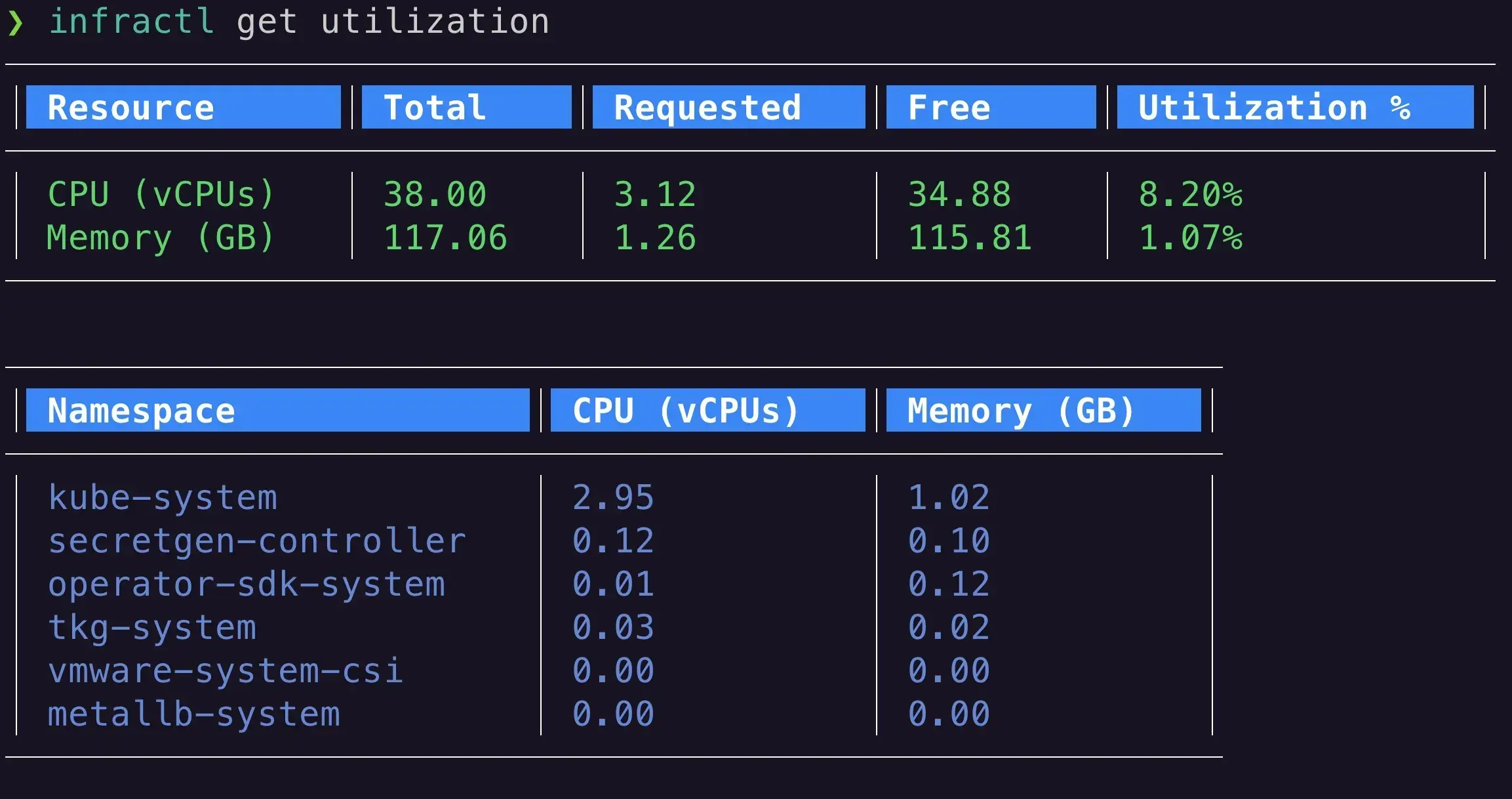
infractl get utilization reports CPU and memory usage at the cluster and namespace level — handy for spotting bottlenecks without a dashboard.
infractl get utilizationExample Output:
Sysctl Testing for Telco Requirements
infractl sysctl verifies that required sysctl parameters are set correctly across nodes.
Example Output:
✓ Sysctl parameter net.ipv4.ip_forward is set to 1
✓ Sysctl parameter net.ipv4.conf.all.rp_filter is set to 0
Quick Namespace and Context Switching
infractl ns and infractl ctx switch namespaces and contexts with built-in fuzzy search, so you don’t have to type out full kubectl config use-context <cluster-name> commands.
Example Output:
Using Infractl in CI/CD Pipelines
Because Infractl is a CLI, it drops into CI/CD pipelines for post-deploy validation. Example Jenkins pipeline:
pipeline {
    agent any

    stages {
        stage('Checkout') {
            steps {
                git 'https://github.com/johnlam90/infractl.git'
            }
        }

        stage('Build') {
            steps {
                sh 'go build -o infractl'
            }
        }

        stage('Test Infrastructure') {
            steps {
                sh './infractl multus -f tests/multus-config.yaml'
                sh './infractl ssh <node-name> -c "systemctl status kubelet"'
                sh './infractl get utilization'
                sh './infractl sysctl'
            }
        }

        stage('Deploy') {
            steps {
                // Deploy your telco application
            }
        }
    }
}
Lightweight
Written in Go, so it’s a single static binary that cross-compiles for whatever architecture you need — local laptop, CI runner, or edge node.
Conclusion
Infractl is opinionated toward the telco workloads I deal with day-to-day, but the underlying patterns — multi-network pod tests, sysctl checks, ad-hoc node access — are useful in plenty of other contexts.
Source is on GitHub: https://github.com/johnlam90/infractl. Feedback and PRs welcome.